Understanding Count and Crawling Limits
NytroSEO is designed to comprehensively crawl up to 20,000 pages per website to fully understand its structure and layout. This ensures no pages are missed, and relevant ones are effectively optimized. However, not all pages are optimized by default, and certain limits apply based on your subscription tier.
Subscription Tiers and Limits
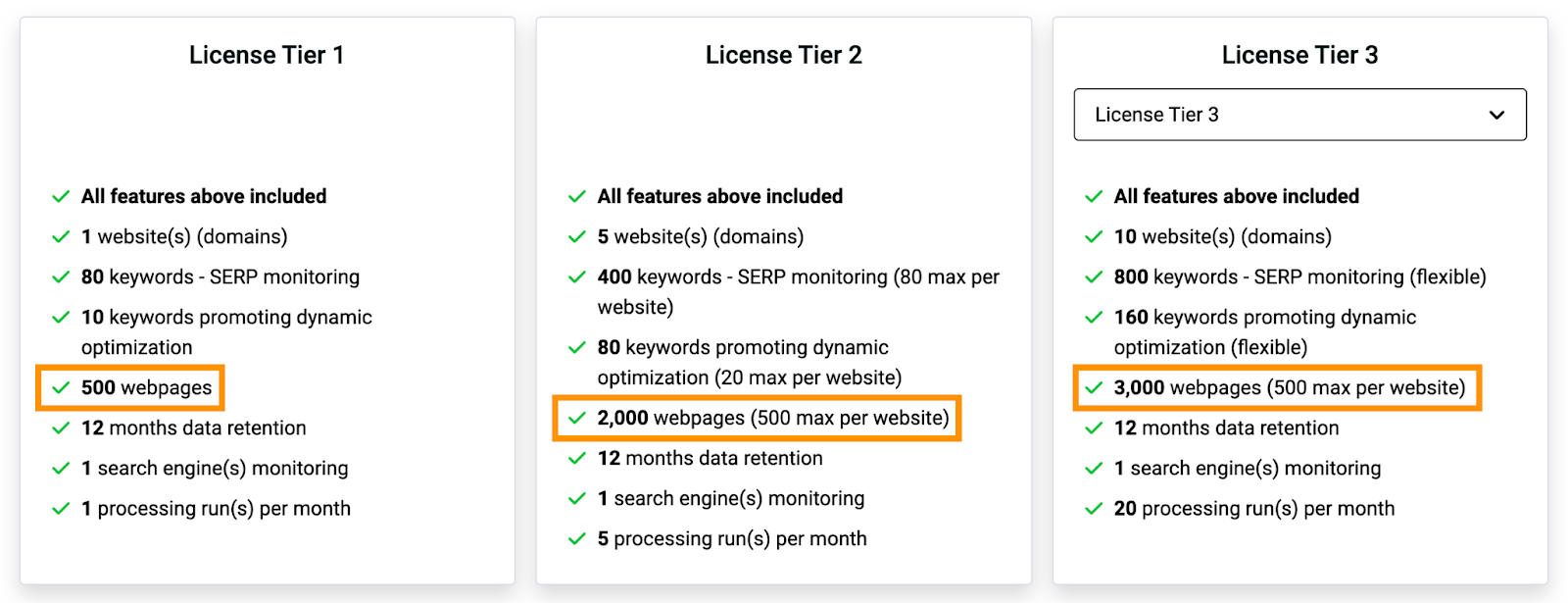
The number of pages NytroSEO can optimize depends on your subscription tier:
Lifetime Deals (LTD) Tiers 1-3: Up to 3,000 pages per account:
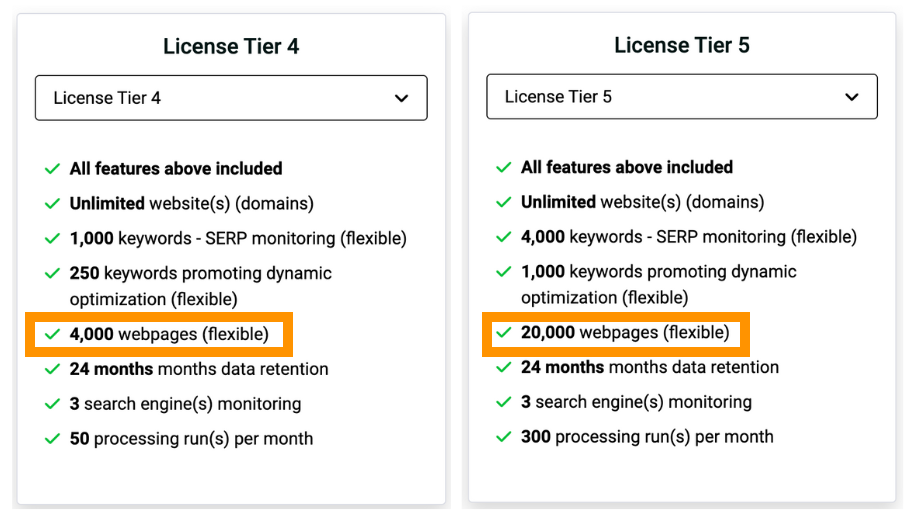
Higher Lifetime Deals (Tier 4-5): Flexible model with up to 20,000 pages per account.
For larger websites, NytroSEO offers special upgrade add-ons, allowing you to optimize more than the default limits. This flexibility ensures that even websites with hundreds of thousands of pages can be effectively optimized, though additional subscriptions or upgrades may be required to accommodate higher page counts.
Exclusion of Non-Usable Pages
To focus on pages that matter, certain non-usable pages are excluded from the optimization process and do not count against your plan limits. These include:
Error pages
Redirects
Canonicalized pages
Non-indexed pages
For instance, if your website has 14,707 canonical pages, a significant number may be non-indexed or otherwise non-usable, reducing the actual count of pages considered for optimization.
Best Practices for Managing Pages
Instead of removing pages from the system, which will result in them being crawled again, it is advisable to disable their optimization. This approach ensures that no legitimate content is missed while keeping your focus on relevant pages.
Getting the Most Out of NytroSEO
To fully utilize NytroSEO's capabilities:
Upgrade Your Subscription: Consider higher tiers or special add-ons to increase your optimization limits.
Regularly Review Non-Usable Pages: Ensure your optimization efforts are focused on relevant pages by regularly reviewing and updating your non-usable page settings.
Customize Page Selection: Use the filter options and bulk selections to specify which pages to optimize, maximizing your plan's capacity.
Check our guide about Managing Your Tiers’ Capacity to know more about the efficient way to manage your tier capacity.
For any questions or further assistance, please contact our support team. We are here to help you maximize your website's optimization potential.